Showing posts with label Vital info. Show all posts

Sunday, 14 July 2013

how to implement Tweet snd linkedin button for each and every post in Your blog ??


how to implement Tweet snd linkedin share button for each and every post in Your blog ??

Some of the Steps we have to follow to complete the above task.

1.Go to Dashboard->Template
2.Click Edit HTML
3.Search <data:post.body/>
4.Paste the below code 
<!--TWITTER-->
<b:if cond='data:blog.pageType != &quot;static_page&quot;'> <div style='text-align:left;padding:5px 5px 5px 0;'> <a class='twitter-share-button' data-count='horizontal' data-related='' data-via='technoblaze1' expr:data-text='data:post.title' expr:data-url='data:post.url' href='http://twitter.com/share'>Tweet</a> <script src='http://platform.twitter.com/widgets.js' type='text/javascript'/> </div> </b:if>
<p>
<!--LINKEDIN-->
<script src='http://platform.linkedin.com/in.js' type='text/javascript'/> 

  <script data-counter='right' type='IN/Share'/></p>

SCREEN SHOTS:

STEP:1
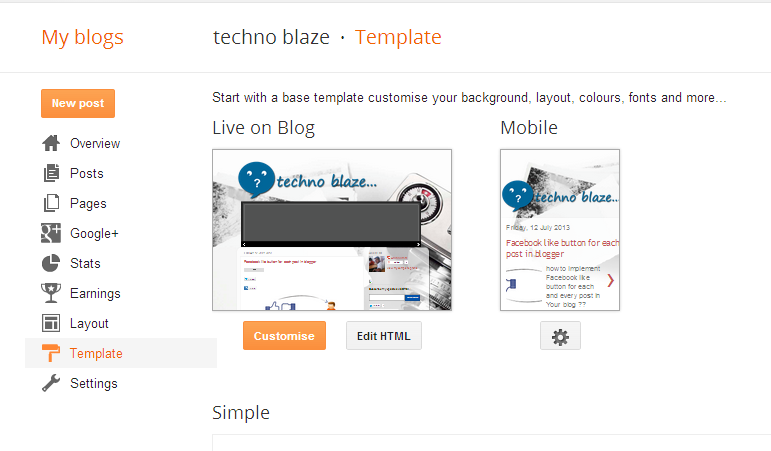
STEP:2 & 3


STEP:4
STEP:5&6


Friday, 12 July 2013

Facebook like button for each post in blogger


how to implement Facebook like button for each and every post in Your blog ??

Some of the Steps we have to follow to complete the above task.

1.Go to Dashboard->Template
2.Click Edit HTML
3.Search <data:post.body/>
4.Paste the below code 
   
<p><iframe allowTransparency='true' expr:src='&quot;http://www.facebook.com/plugins/like.php?href=&quot; + data:post.url + &quot;&amp;layout=button_count&amp;show_faces=false&amp;width=100&amp; action=like&amp;font=arial&amp;colorscheme=light&quot;' frameborder='0' scrolling='no' style='border:none; overflow:hidden; width:100px; height:20px;'/></p>

5.Click Save template
6.View your blog.

Screen shots:

Step:1


Step:2 & 3


Step:4

Step: 5 & 6


Monday, 1 July 2013

Cloud Computing


Cloud computing is a colloquial expression used to describe a variety of different computing concepts that involve a large number of computers that are connected through a real-time communication network (typically the Internet). Cloud computing is a jargon term without a commonly accepted non-ambiguous scientific or technical definition. In science, cloud computing is a synonym for distributed computing over a network and means the ability to run a program on many connected computers at the same time. The popularity of the term can be attributed to its use in marketing to sell hosted services in the sense of application service provisioning that run client server software on a remote location.


Advantages:

We can use and access the cloud from any where through internet.
Reduce the Storage capacity in your harddrive.

Cloud Storage Services :

Cloud storage services offer paid monthly subscriptions either for unlimited storage or for hundreds of gigabytes of data. Most of us do not have that much critical data to backup and therefore it would be a total waste of money. And for those of us who have data which cannot be stored using the 1 or 2GB free space offered, we have a list of four of the best free online storage services that offer free space of more than 10GB.

Best Sites for Cloud Computing :


1.Google Drive:

  Link : https://drive.google.com/
 

2.DROP BOX

Link:https://www.dropbox.com/


3:BOX

Link: https://www.box.com/


4:SKYDRIVE

Link: https://skydrive.live.com/

Tuesday, 25 June 2013

Kick Start for HTML,CSS

http://www.99lime.com/
Tips for using html and css in easy way :
go to -------->http://www.99lime.com/
goto---------->HTML kick Start
download--->from github
And call the particular class files mentioned in tutorial..


Monday, 20 May 2013

what is the Best programming Language to learn in 2013


An interesting article caught my eye at jobstractor.com — the programming language trends review. The company analyzed more than 60,000 job vacancies during 2012 to produce a chart of the most sought-after technologies:

                            
                Language                              Jobs
                            PHP                                                                      12,664
                            Java                                                                      12,558
                            Objective C                                                          8,925 
                            SQL                                                                       5,165                                           
                            Android(java)                                                       4,981
                            Ruby                                                                     3,859            
                            Javascript                                                             3,742
                            c#                                                                           3,549
                            c++                                                                         1,908
                            Actionscript                                                           1,821
                            Python                                                                   1,649
                            C                                                                            1,087
                            Asp.net                                                                  818


Despite developer complaints, demand for PHP and Java (server/Android) remains strong. You would also expect those jobs to require some SQL knowledge although that has a strong showing in its own right. ActionScript is a dying art so it’s rapidly falling off the chart.

WORLD TOP TEN PROGRAMMING LANGUAGES

1.JAVA :
     An object-oriented programming language developed in the late 1990s by James Gosling and colleagues at Sun Microsystems.

2.C:
    C, a general purpose programming language built by Dennis Ritchie when he was a part of Bell Telephone labs, is the bass of C++ and other programming languages. It was built to work with the Unix operating system.

3.C#:
   This general-purpose programming language developed by Microsoft evolved from C and C++ as a part of the software company’s .NET initiative.

4.C++:
    C++ is a general purpose multi-paradigm spanning compiled language that has both high-level and low-level languages’ features. It was started as an enhancement to the C programming language,Bjarne Stroustrup in 1979.

5.Objective-c:
     This object-oriented programming language created first by Brad Cox and Tom Love at their company Stepstone in the early 1980s, adds Smalltalk-like messaging to the C programming language.

6.PHP:
    This language is especially suited for Web development because of it easy embedding into HTML pages. It is an open-source, server-side, cross-platform, interpretive HTML scripting language

7.VB :
   This is an event-driven programming language which is implemented on Microsoft’s .Net framework.

8.Python :
    This is an event-driven programming language which is extensively used by Google because of its simplicity. It is managed by the Python Software Foundation.

9.perl :
    Being a high-level programming language, its emphasis lies in code readability and clear syntax. It combines Object-oriented and functional programming styles, and is often used as a scripting language. Perl is an open-source language used widely to process text through CGI programs.

10.Javascript :
    JavaScript is an object-oriented scripting language that is smaller than Java. Being a client-side language, it runs in the web browser on the client-side with a simplified set of commands, easier code and no need for compilation.


Sunday, 21 April 2013

Steps To become a Programmer


HOW TO BECOME A PROGRAMMER :
Becoming a programmer is a Advancing process that builds up your skills day by day and year by year, and programming can be fun and rewarding (mentally, spiritually and financially). This guide does not promise to give a magically easy way to becoming a programmer, and the ordering of the steps is not sacred, but you'll get a general outline of how to become a programmer in one of the modern programming fields.


Step 1 :
  Take the preliminary course


Step 2:
Learn Database concepts such as tables,views,triggers,procedures
you can learn any simple database packages, such as
-Msaccess
-Mssql
-Mysql
this are all good database to learn and database are commonly accessed by sql queries

Step 3: 
Decide what programming you want to be
-web programmer
-Desktop Application programmer
    -Operating system (OS) oriented programmer
    -Platform-independent programmer
-Distributed applications programmer
-Library/platform/framework/core programmer
-System programmer
   -Kernel programmer
   -Driver programmer
   -Compiler programmer
-Programming scientist

Step 4:
Learn the technologies and programming languages related to your programming field of choice.

Step 5:
Do projects from what are the technologies u learnt , be strong in that

Step 6:
Learn advanced concepts day by day and implement it .


Saturday, 20 April 2013

want a mind sharpness, 10 things to do it !


Exercise
Book Reading
Eat Healthy food
Maintain good posture
Sleep well
Do painting,drawing and do some doodle works
Listen to Music
Learn something new
Puzzle solve
Do Blogging 

Wednesday, 17 April 2013

ANDROID VERSION STATISTICS In 2013


ANDROID VERSION 4.2 [ jelly bean ]

Android 4.2 jelly bean have greater than the speed and capacity while comparing to Android 4.1 and they include all the features like Photo Sphere and a completely redesigned camera app, new Gesture Typing keyboard, Google Now with all new cards, and much more.

Features : 
  • Everything in Jelly Bean feels fast, fluid, and smooth. Moving between home screens and switching between apps is effortless, like turning the pages of a book.
  • Jelly Bean improves performance throughout the system, including faster orientation changes, quicker switching between recent apps, and smoother and more consistent rendering across the system through vsync and triple buffering.
  • Jelly Bean has more reactive and uniform touch responses, and makes your Android device even more responsive by boosting your device’s CPU instantly when you touch the screen, and turns it down when you don’t need it to improve battery life.

     ANDROID STATISTICS :


Friday, 12 April 2013

Windows 8 Merits and Demerits


Advantages / Pros:


1. Anticipation for the touch screen
Windows 8, the interface dubbed Metro, is really Anticipate for touch interface with Windows Phone Vogue form.

2. Supports ARM chip
Windows 8 supports devices using ARM chips Framework. Windows 8   conventional  add to the reach of Windows 8 in the tablet arena, given that most currently available tablets using ARM chips. 3.Booting time will be shorter while comparing to previous windows version. Windows 8 will takes only 8 seconds to boot up.

4. Windows 8 does not require a PC upgrade User not need to upgrade the pc requirements , According to Microsoft, both windows 7 and 8 will run in 1GB RAM and Atom processor.

5. Windows app store windows 8 having their own App store called windows store. Windows Store provides a wide range of applications that are optimized for Windows 8. 6. Windows 8 Supports NFC (Near Field Communications)
Windows 8 will support NFC, a technology that their role, among others for financial transactions digitally. Windows 8 tablet taking was likely to automatically include this feature. 


Disadvantages / Cons:


1. Overlap between Metro UI and Aero UI.
Developers find the constant change that occurs between the tile-based Metro UI and glossy Aero UI. It is considered without reasonable and very confusing. Switching from chute applications and desktop applications is very difficult. 


 2. There is no option to turn tiles into icons. The smallest size of the tiles, zoom is still too big. When we install a lot of applications will then screen the chute will look chaotic.

3. It is difficult to move between screens. The absence of such a function Alt-Tab while working with the desktop and keyboard to switch from one app to another app might be a very difficult thing. Instead, on the Windows 8 Metro UI we can not use the pointer or finder to put the screen on the left side and drag. It sounds so trivial, but problems will arise when we are working with many applications. There is no quick and easy way to switch between applications. If you move the mouse to the left then the icon will pops up. And if it is not right then we have to click several times, or try again.


 4. chute multitasking. If my friend uses Metro application (for tablets) in Windows 8, the screen will display two applications are lined. For starters it would not be a big deal. But for advanced users, the ability of Metro to multitasking just for the two applications is a fatal weakness.

 5.chute. Metro is able to work well on tablets but the UI is not very compatible when used on the desktop. Hard to do for my friend who use Notebook. So that by default Windows 8 could not boot to the Metro UI. In other words, Microsoft needs to provide kill-switch to turn off the Metro UI. 

 6. Flash content on the Tablet PC. Apparently Microsoft is deliberately making Windows 8 can not support Flash content on Tablet PC. The reason Microsoft is doing this is to save battery Tablet. It also can protect our privacy and enhance security Tablet. This is because in some applications, and other electronic devices, the use of Flash content even cause data damage or crash.